Short answer
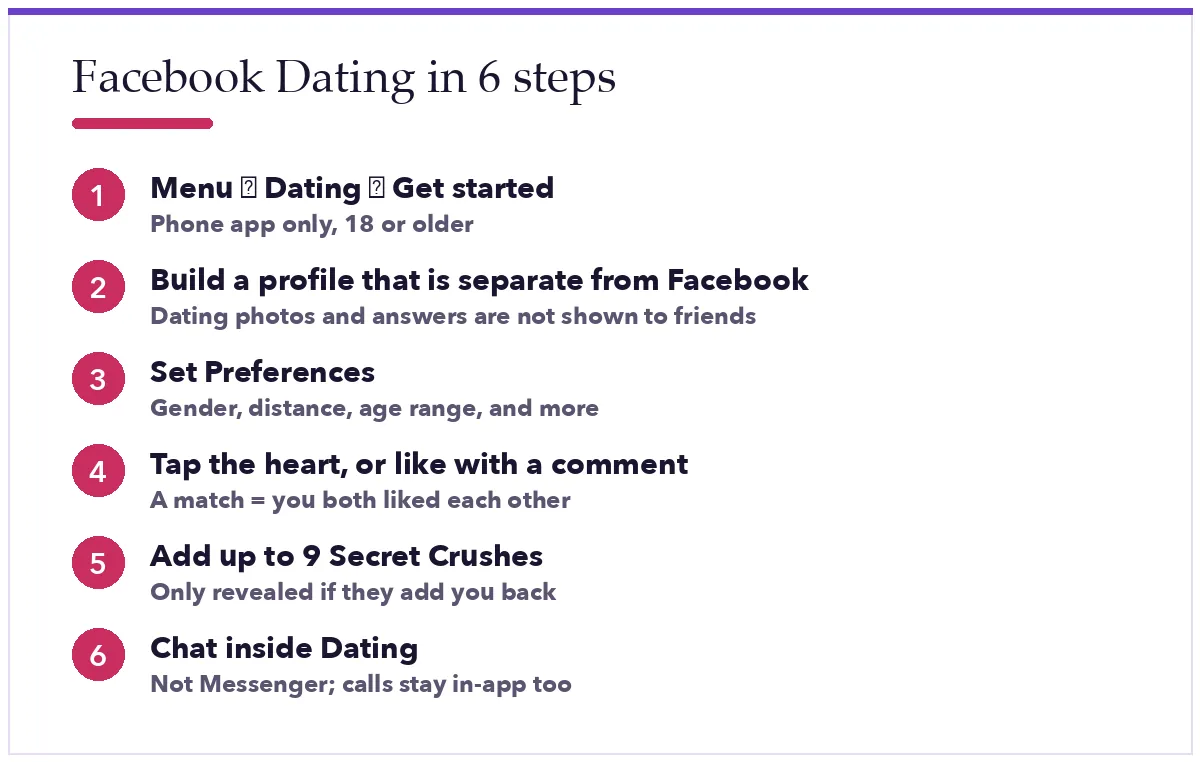
Open the Facebook app, tap Menu, tap Dating, then Get started. Build your Dating profile, set Preferences (gender, distance, age), then browse Suggestions. Tap the heart to like someone, or tap a photo or answer to like it with a comment. If they like you back, you match and can chat inside Dating.
Facebook Dating is a free feature inside the Facebook app for Android and iPhone. It uses your interests, the Facebook groups you are in and the events you go to, to suggest people you actually have something in common with. This guide walks through setting it up properly, how liking and matching work, the two features most people never find, and how to fix the usual problems.
1. Turn on Facebook Dating
- Open the Facebook app and tap Menu.
- Tap Dating (tap See more if you do not see it).
- Tap Get started. You must be 18 or older. If Facebook is unsure of your age, it asks for a quick video selfie or an ID photo first.
- Confirm the basics it pulls from Facebook: first name, age and location. Then add your gender and who you want to see.
Your Dating profile is separate. Photos and answers you add here are not shown on your Facebook profile, and your Dating conversations are not in Messenger.
2. Build a profile that gets likes
- Four to six photos. One clear face, one full-length, one doing something you love. Recent, no group shots as the first photo.
- Answer the prompts. Short and specific beats clever. “Best taco in town: the truck by the station” invites a reply; “I love to laugh” does not.
- Add interests. Dating ranks suggestions partly on shared interests, so pick the real ones.
- Link Instagram if you use it. You can show Instagram posts on your Dating profile without exposing your Facebook profile.
3. Set your preferences
In Dating, tap your profile picture and open Preferences. Set Gender, a realistic Distance (up to about 100 km) and an Age range. You can also filter by height, religion, kids and more. Tighter filters mean fewer but better suggestions; loosen them if your list runs dry.
4. How likes and matches work
- Heart means you like the whole profile. X passes.
- Tap a specific photo or prompt answer to like with a comment. This sends your note with the like and gets far more replies than a plain heart.
- If someone likes you first, they appear under Liked You. Like them back and you match.
- A match unlocks the chat. Your matches and conversations live under Matches inside Dating.
5. Secret Crush: the feature for people you already know
Have a crush on a Facebook friend or someone you follow on Instagram? Add them to Secret Crush (up to nine people). They are only told that “someone” added them. If they add you to their list too, you both get a match. If not, nothing happens and nobody finds out.
6. Let Dating do some of the work
Two newer features cut down on swiping. Meet Cute pairs you with one surprise match a week chosen by Dating’s algorithm; you can chat, unmatch, or switch it off. Dating assistant is a chat helper in the Matches tab where you can type what you are looking for in plain words and get tailored suggestions. Meta rolled both out in the US and Canada from September 2025, so they may not be in your app yet.
7. Start the conversation
Mention something from their profile in the first message and ask one easy question. Reply within a day. Suggest a short, public first meeting (coffee, a walk) once the chat has some life in it. If good-morning texts are your style once things click, our good morning messages for lovers are there for later.
Troubleshooting
- No Dating in the menu. Facebook Dating is not available in every country and never on the website. Nothing you change in settings will add it early.
- Stuck on age verification. Good lighting for the video selfie, or upload a government ID. Meta says the ID is encrypted and never shown on your profile.
- Few suggestions. Widen distance and age, add interests, and allow location for Facebook in your phone settings.
- A match vanished. They unmatched or deleted their Dating profile. It is not a bug, and there is no way to see who it was.
Next: how messaging works on Facebook Dating, and how to find single women near you.
Common questions
Is Facebook Dating really free?
Yes. There is no paid tier, no boosts to buy and no subscription. Anyone asking you to pay for Dating features is not Facebook.
Can I use Facebook Dating on a computer?
No. It only exists in the Facebook app for Android and iPhone.
Will my friends see my Dating profile?
No. Friends are not shown your Dating profile or suggested to you, unless you both use Secret Crush on each other.
How do I delete my Dating profile?
In Dating, tap your profile picture, open Settings, and choose Delete profile. Your Facebook account is untouched.
Facts checked against Meta’s newsroom (“Facebook Dating Adds Features to Address Swipe Fatigue”, September 2025; “Bringing Age Verification to Facebook Dating”, December 2022) and the Facebook Help Center in September 2026. Not affiliated with Meta.