Short answer
Facebook Dating already shows people near you. To see single women in your area, open the Facebook app, tap Menu, tap Dating, open Preferences, set Gender to Women and Distance to the radius you would really travel. Save, and your Suggestions refresh.
That is the whole trick. Facebook Dating has no separate “single women near me” page. It uses your location and the preferences you set, then puts the closest matches first. The steps below show every tap, what “near me” actually means to Facebook, and what to do when Dating is missing from your menu.
Facebook Dating only exists inside the Facebook phone app on Android and iPhone. There is no website version and no separate app to download, so if a page asks you to “sign up for Facebook Dating” somewhere else, close it.
Set Facebook Dating to show single women near you
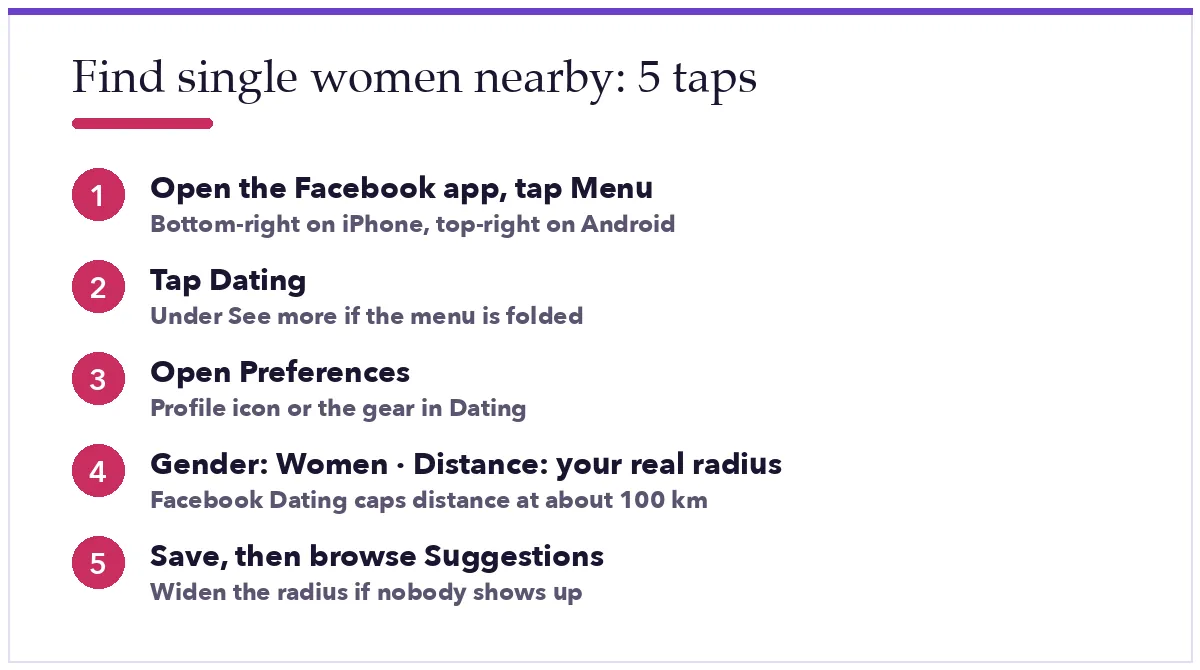
- Open the Facebook app and tap Menu. It is the three-line icon, bottom-right on iPhone and top-right on Android.
- Tap Dating. If you do not see it, tap See more first, or type “Dating” in the search bar at the top of the menu.
- First time here? Tap Get started and build your Dating profile. It is separate from your normal profile, and your Facebook friends are not shown it.
- In Dating, tap your profile picture (or the gear icon) and open Preferences.
- Set Gender to Women.
- Set Distance. Start with the radius you would honestly drive for a first date. Facebook caps it at roughly 100 km (about 60 miles).
- Optional: set an Age range, and anything else that matters to you, such as Has kids or Religion.
- Go back to Suggestions. The list rebuilds around your new settings, closest people first.
What “near me” means to Facebook Dating
Dating reads your location from your phone while you use the app and from the city on your Dating profile. If your phone’s location permission for Facebook is off, Dating falls back to your profile city, which can be stale. Check Settings on your phone, find Facebook, and allow location While using the app if your suggestions look like they are from the wrong town.
Distance is measured from you to each person’s last known location, not their home address. Someone who commutes into your city can show up as “nearby” even if she lives an hour out. That is normal.
Get shown to more women in your area
Preferences filter who you see. Who sees you depends on your profile, so spend ten minutes on it:
- Photos taken locally. A clear face shot plus one at a place people in your city recognise. It starts conversations on its own.
- Answer the prompts. Profiles with answered questions get more likes than a blank one with six photos.
- Add your interests. Dating uses them to rank suggestions both ways.
- Use groups and events. Facebook Dating can suggest people who are in the same Facebook groups or going to the same events. Join a couple of real local groups (a running club, a neighbourhood page) and they feed your suggestions.
- Try Meet Cute. In the US and Canada, Dating can pair you with one surprise match a week based on its matching algorithm. You can chat or unmatch, and you can turn it off any time.
Once you match, the first message matters more than the profile. If you freeze up, borrow an opener from our flirty text messages collection and make it about something on her profile.
Don’t see Dating, or nobody shows up?
- Dating is not in the menu. Tap See more. Still nothing? Facebook Dating is only available in some countries (the US, Canada, Mexico, most of South America, the UK and EU, and parts of South-East Asia). There is no setting that turns it on early, and the website never has it.
- You are asked to verify your age. Dating is 18+. If Facebook thinks you might be under 18, it asks for a video selfie (checked by a company called Yoti) or a photo of an ID before you can continue.
- Suggestions are empty or far away. Widen Distance, loosen the age range, and check the location permission above. Small towns simply have fewer people on Dating.
- Same faces every day. Dating shows a limited batch of suggestions per day. Liking or passing on them brings new ones.
Stay safe with “near me” matches
Being close by makes a first meeting easy, and it makes scams easier too. Keep chats inside Dating until you have met. Do not send money, gift cards or “verification” fees for any reason. Meet in a public place in daylight, get there on your own, and tell a friend where you are. If a match pushes back on any of that, unmatch and report from the chat menu.
Want the wider picture beyond Facebook? Read how to find local singles near you, then how to use Facebook Dating to find your best match.
Common questions
Can I search Facebook Dating by name or city?
No. Dating has no name search and no city search. You set preferences and Facebook picks the suggestions. To change city, update your location in your Dating profile or move your distance radius.
Will my Facebook friends see that I am looking for single women?
No. Your Dating profile, likes and conversations are not shown to friends and never appear on your regular profile or News Feed. Friends are also not suggested to you unless you both add each other as a Secret Crush.
Are “Single Women Near Me” Facebook groups safe?
Treat them with care. Many are run by scammers who collect phone numbers. Use Dating’s own suggestions first; if you join a group, keep it to real local groups about hobbies or your neighbourhood, and never pay anyone to “unlock” contacts.
Facts checked against Meta’s newsroom and the Facebook Help Center in September 2026. Facebook moves menu items around often; if a label here looks different in your app, search for it inside the Menu. Not affiliated with Meta.